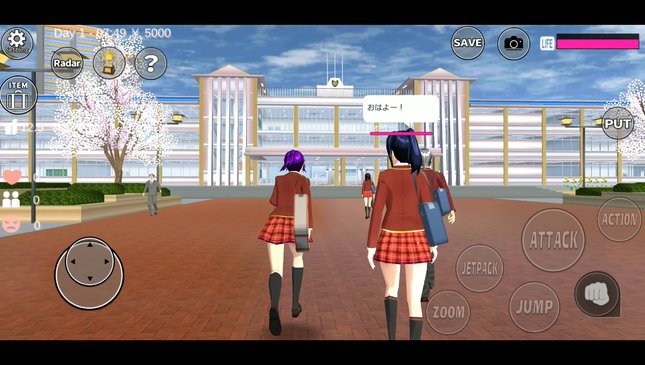
- Version 1.048.18 went live on Google Play on October 31, 2026.
- New Sun option under Weather in Game Setting: the sun shows by day and the moon by night.
- The sun rises from the right side of the map by default, and its angle can be changed.
- High-spec phones can now set display distance to 500 m or 700 m, at the cost of more battery.
- One bug fix: fallen characters no longer briefly look like they are already standing.
Sakura School Simulator received a new update on the last day of October. Version 1.048.18 is small on paper, but it changes how Sakura town looks: there is now a visible sun in the sky, and powerful phones can see much farther across the map.
Most coverage of the game focuses on hidden places and cheat-style tricks. This article sticks to what Garusoft actually wrote in the official patch notes on Google Play, checked on November 2, 2026, and explains what each change means in practice.
Quick answer: Sakura School Simulator 1.048.18, released on Google Play on October 31, 2026, adds a Sun setting under Weather in Game Setting (sun by day, moon by night, adjustable angle) and lets high-spec devices raise display distance to 500 m or 700 m. It also fixes a getting-up animation bug.What's New in Version 1.048.18
According to the "What's new" section on the game's Google Play page, the update contains three changes:
| Change | Details from the patch notes |
|---|---|
| Sun weather | "Sun" added under Weather in Game Setting. The sun is shown during the day and the moon at night. |
| Sun position | By default the sun appears from the right side of the map. The angle can be changed. |
| Display distance | On high-spec machines only, display distance can be set to 500 m or 700 m. Battery usage will increase. |
| Bug fix | Fixed a fallen character briefly looking as if they were already standing while getting up. |
The listing shows the update date as October 31, 2026, and the game still requires Android 7.0 or newer.
How the New Sun Setting Works
Before this patch, players could change the weather, but the sky had no visible sun that followed the day. Now the sun and moon act as part of the day and night cycle. Because the angle is adjustable, players can choose where light comes from.
This matters most for people who use Sakura School Simulator as a stage for photos and short videos. A low sun angle gives long shadows and warmer scenes, while a high angle makes the school and streets look evenly lit.
To find it, open the settings (gear) menu, go to Game Setting, then look under Weather for the new Sun option.
700m Display Distance: Who Can Use It
The second change is more technical. Display distance decides how far away buildings, people and objects are drawn. Garusoft says the new 500 m and 700 m options are available on high-spec machines only, and warns that battery usage will increase.
The developer's own store description already says the game uses a lot of CPU and GPU, and recommends more than 3 GB of RAM and a chip at the level of a Snapdragon 820 or better for smooth play. On weaker phones, keeping the default distance is the safer choice.
Is the Update on iPhone Yet?
When we checked the App Store listing on November 2, 2026, its version history still ended at 1.048.11, a fix for some languages not being displayed. The App Store and Google Play often receive Sakura School Simulator updates on different days, so iPhone and iPad players may need to wait for 1.048.18.
The previous content update, 1.048.10, added five boy hairstyles, two girl hairstyles, new costumes, and props such as mirrors, plants, pots and rocks.
Tips Before You Turn It On
- Update from the official store only. APK sites that promise "new update" files are not from Garusoft.
- Try 500 m first. If the game stays smooth, then move to 700 m.
- Watch the battery. Garusoft itself says longer display distance drains more power.
- If the game lags, the developer recommends restarting the game or device and using the setting that decreases the number of students and people.
- Close other apps while playing, as the store description advises.
FAQ (Frequently Asked Questions)
On Google Play, the latest version is 1.048.18, updated on October 31, 2026. The App Store version history showed 1.048.11 when checked on November 2, 2026. Open the settings menu, choose Game Setting, and select Sun under Weather. The sun appears by day and the moon at night, and you can change the angle. Garusoft says the 500 m and 700 m options are available on high-spec machines only. If your phone does not meet that level, the option will not be offered. Yes, when you raise display distance. The patch notes state that battery usage will increase. No. It adds two settings (Sun weather and longer display distance) and one bug fix. It does not add new costumes or buildings.1. What is the latest version of Sakura School Simulator?
2. How do I turn on the sun in Sakura School Simulator?
3. Why can't I set display distance to 700m?
4. Does the new update use more battery?
5. Is 1.048.18 a big content update?
Conclusion
Sakura School Simulator 1.048.18 is a quality-of-life update rather than a content drop. The Sun setting gives creators more control over lighting, and the 700 m view makes Sakura town feel bigger on strong phones.
Players on older devices do not lose anything: the new distance options are optional and limited to high-spec hardware.
- 1.048.18 launched on Google Play on October 31, 2026.
- New Sun option under Weather, with sun by day, moon by night and an adjustable angle.
- High-spec phones get 500 m / 700 m display distance; battery use rises.
- The App Store listing still showed 1.048.11 on November 2.
- Garusoft recommends 3 GB+ RAM and a Snapdragon 820-class chip for smooth play.