- BUSSID has about 242 million installs on Google Play since March 27, 2017.
- The official BUSSID Mod Editor (formerly Vehicle Editor) builds both vehicle and map mods.
- The editor runs on Windows 7 or later (Windows 10 recommended) with Visual C++ 2017.
- Free official livery templates work in mobile apps or Photoshop (PSD).
- Latest game update 4.6 (October 22, 2026) adds a Sticker System.
Bus Simulator Indonesia, known as BUSSID, is one of Indonesia's best-known mobile games, famous for its authentic routes, bus companies and the "Om Telolet Om" horn craze. Much of its long life comes from players adding their own vehicles and paint jobs.
English search results for BUSSID mods are mostly download pages and videos. This guide explains the official modding route, using developer Maleo's website bussimulator.id and the Google Play listing, checked on November 2, 2026.
Quick answer: Bus Simulator Indonesia supports official mods. Developer Maleo provides the free BUSSID Mod Editor for Windows to turn 3D models into vehicle and map mods, plus free livery templates for mobile apps and Photoshop. Mods and liveries are added through the game's garage and mod menus.Bus Simulator Indonesia at a Glance
| Item | Details |
|---|---|
| Developer | Maleo |
| On Google Play since | March 27, 2017 |
| Installs | About 242 million (shown as 100M+) |
| Rating | 4.1 stars, about 3.73 million reviews |
| Latest update | Version 4.6, October 22, 2026 (Sticker System, bug fixes) |
| Requires | Android 7.0 or newer |
| Platforms | Android; Windows via Google Play Games |
| Monetization | Contains ads ("no obstructive ads while driving"); digital purchases |
Maleo describes itself on the official site as a small team that works and collaborates entirely online from several cities in Indonesia.
How the Mod System Works
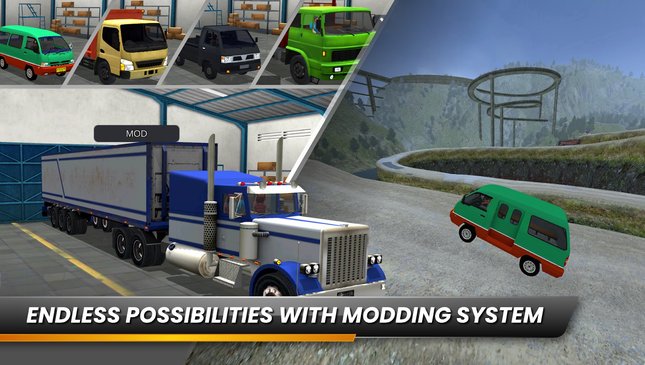
Google Play lists "use your own 3D model using vehicle mod system" as a core feature. In practice, there are three kinds of user content:
| Type | What it changes | Official tool or source |
|---|---|---|
| Livery | The paint and graphics on a bus | Livery templates; mobile apps or Photoshop |
| Vehicle mod | Adds a new bus, truck or car | BUSSID Mod Editor + 3D model |
| Map mod | Adds a new road or area | BUSSID Mod Editor (since version 1.6) |
The official site also hosts free sample content made by its own team account, "Kernet", including an official map mod called Kelok Naga.
The BUSSID Mod Editor
The editor is Maleo's in-house tool that "sets up a vehicle 3D model into a BUSSID-ready vehicle mod". It was originally called the BUSSID Vehicle Editor and was renamed when map mod support arrived.
| Version | Changes |
|---|---|
| 1.5 | Trailer truck support, driver placement, bug fixes |
| 1.6 | Renamed to BUSSID Mod Editor; map mod support |
| 1.7 (latest) | Trailer physics bug fixes |
System requirements: Windows 7 or above (Windows 10 recommended) and the Microsoft Visual C++ 2017 Redistributable in both 32-bit (x86) and 64-bit (x64) versions. The download page shows more than 5 million downloads.
To learn it, Maleo offers a 7-video tutorial series that starts from the basics, and sample mods with source files, such as a wooden-bed truck (Truk Bak Kayu) and a minibus (Mobil Angkot).
Making Your Own Livery
Liveries are the easiest way to start. The official site offers free templates for the game's buses, including Srikandi SHD, Bimasena SDD, Arjuna XHD and Nakula-Sadewa.
- On a phone: Maleo's tutorials use MediBang Paint, and a simpler Picsart version is also available.
- On a computer: special PSD templates for Photoshop.
- Window stickers: since BUSSID 2.4, liveries saved as PNG can include stickers on the glass.
- Install: finished liveries are applied to your bus through the in-game garage menu.
Version 4.6 adds a new Sticker System to the game itself.
Staying Safe With Mods
- Start with the official samples and templates on bussimulator.id.
- Avoid modified game APKs. Mods are files loaded by the official game, not a different version of it.
- Back up your favorite liveries; the game itself saves progress online.
- Share your work in the official Bus Simulator Indonesia Facebook group, as Maleo suggests.
FAQ (Frequently Asked Questions)
Yes. Its Google Play listing names a vehicle mod system that lets you use your own 3D models. Maleo's free Windows tool for converting 3D models into vehicle and map mods. It was formerly called the BUSSID Vehicle Editor. Windows 7 or later (Windows 10 recommended) and the Visual C++ 2017 Redistributable, both 32-bit and 64-bit. On the official site bussimulator.id, which offers free templates for buses such as Srikandi SHD, Bimasena SDD, Arjuna XHD and Nakula-Sadewa. Yes. Maleo's tutorials show how to edit templates with MediBang Paint or Picsart on mobile. Version 4.6, released on October 22, 2026, adds a Sticker System and various bug fixes.1. Does Bus Simulator Indonesia support mods?
2. What is the BUSSID Mod Editor?
3. What do I need to run the BUSSID Mod Editor?
4. Where can I get official BUSSID livery templates?
5. Can I make a livery on my phone?
6. What is new in Bus Simulator Indonesia 4.6?
Conclusion
Bus Simulator Indonesia has stayed popular for more than nine years partly because players can make it their own. Maleo backs that with official tools: the BUSSID Mod Editor, free livery templates and sample mods with source files.
For anyone starting out, the safest route is the official one: templates and samples from bussimulator.id, and the game itself from Google Play.
- BUSSID: ~242 million installs since March 27, 2017.
- BUSSID Mod Editor 1.7 makes vehicle and map mods.
- Needs Windows 7+ and Visual C++ 2017.
- Free livery templates for mobile apps and Photoshop.
- Game version 4.6 (Oct 22, 2026) adds a Sticker System.