A building looks perfect in a video. The creator posts a long Props ID, you type the numbers into Sakura School Simulator, and nothing appears. Sometimes the game says it cannot find the data. Sometimes a download seems to finish, but the expected house is nowhere in sight. The temptation is to restart everything or install a modified version of the game. Neither should be the first move.
In Sakura School Simulator, a Props ID points to a player-made arrangement of objects. It is not a redeem code, a cheat or a shortcut to multiplayer. The sharing system has its own account, saved designs and online downloads. A problem in any one of those stages can leave a player staring at an empty space.
Highlights
- Check the full number and the creator's instructions before assuming a Props ID has stopped working.
- Props sharing uses a separate upload-and-download system; a locally saved design is not automatically public.
- A code can fail because the upload is unavailable, the sharing account is not signed in or the connection drops.
- Loading an elaborate build can strain a phone even when the code itself is valid.
- Reinstalling the game should be a last resort, particularly if locally stored work has not been backed up.
Quick answer: To troubleshoot a Sakura School Simulator Props ID, confirm the number, connect to a reliable network, open the Props sharing menu, check your account and test a second known design. If a second ID works, the first upload may be unavailable. If neither works, investigate the account or connection before touching saved data.
First, understand what a Props ID actually opens
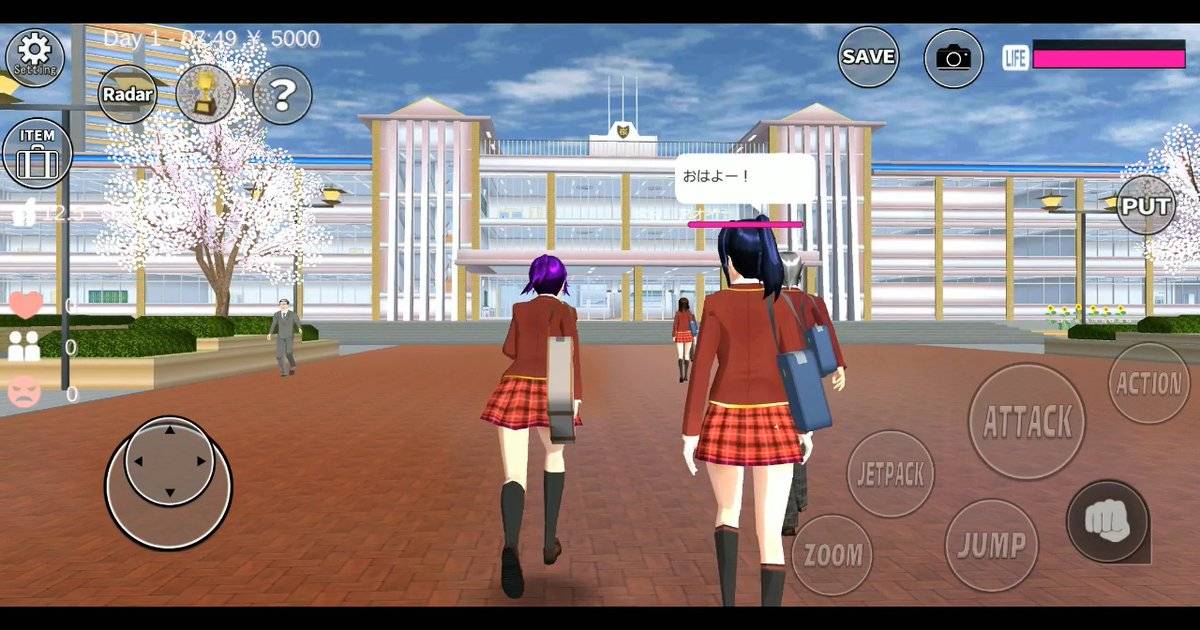
Sakura School Simulator is an open-ended school-life game from Japanese developer Garusoft. Its appeal goes beyond attending classes or chatting with characters. Players can arrange objects into houses, cafés, parks and film sets. A Props ID is the reference used by the community-sharing feature to retrieve one of those creations.
The important distinction is between three things: what exists in the town by default, what a player has built and saved locally, and what another creator has uploaded for others to download. A screenshot might show all three together. The ID, however, relates to the shared Props data rather than every object visible on the screen. That explains why a downloaded build may not recreate a creator's entire video scene exactly.
The game's interface has changed over time, so a tutorial recorded a few years ago may point to a slightly different menu. Look for Props in the main menu or in the character/item editing area, then find the sharing and search controls. The terminology can differ by version. It is more useful to follow the feature's purpose than to copy an old screenshot button for button.
The six checks worth making before trying again
1. Copy the entire ID, not just the visible digits
Long numbers are easy to misread on a phone. Video captions may cut off the first or final digits. Decorative fonts can make a 1 look like a 7, while an accidental space can spoil a paste. Compare the number with the creator's written caption if one exists. If the creator has pinned a corrected code, use that instead of the text embedded in an older video.
Do not invent a replacement digit if a number looks blurred. Ask for the written ID or try a different verified creation. Randomly changing digits is unlikely to find the intended building, and it makes troubleshooting harder because you no longer know which code you actually tested.
2. Test an internet connection that can download shared content
The core game can be enjoyed without a constant connection, but downloading a creation from a sharing service is different. Switch between Wi-Fi and mobile data once, if practical, and try again. A weak signal can interrupt retrieval even though ordinary web pages still load. Public Wi-Fi may also restrict connections to gaming services.
For players in Malaysia using a prepaid mobile plan, check whether the plan has usable data remaining instead of assuming that a full signal-bar icon means an unrestricted connection. Turn off a VPN temporarily if it is causing unreliable routing. There is no need to modify router security or install a network booster just to download a Props design.
3. Confirm the sharing account is ready
The community's documented sharing system uses an account for uploads and downloads. That account is not the same as the school character you control. It may have a user ID, screen name and password. If the game asks you to sign in, complete the process inside the official application. Do not put your account password into a page advertising free buildings or unlockable characters.
If you have not used sharing on that device before, begin with the account setup offered by the game. If you previously used it, check whether the app still recognises the session. A successful connection to the internet does not mean you have automatically passed the account step.
4. Try another known design
This simple experiment is more useful than pressing Download ten times. Take a second Props ID from another creator with a recent, legible post. If that design loads correctly, the app's sharing feature is probably functioning and the first creation deserves closer scrutiny. It might have been withdrawn, replaced or entered incorrectly.
If both IDs fail in the same way, look for a common cause: the account, network, app build or a broader service issue. Keep the two results separate in your notes. A screenshot of the exact error message can help distinguish an empty response from an interrupted download.
5. Look for the creation where the creator placed it
Not every shared arrangement appears in front of the player. A design can be placed at a different position in the town, and a video may start after the creator has already travelled there. Read any location instruction published alongside the code. Search the intended area rather than assuming that the download failed because you cannot see the building at the spawn point.
If the game shows the design name or a preview before download, compare it with the video. Matching the name but visiting the wrong part of town is a different problem from the search returning no result at all. Separating these cases prevents unnecessary changes to the app.
6. Consider the size of the build and the phone's performance
A detailed city, villa or amusement park can contain many individual objects. That gives the scene its appeal, but it also creates more work for the phone. Garusoft warns that the game is demanding on CPU and GPU resources and recommends more than 3 GB of RAM with a Snapdragon 820-class chip or better for smooth play. A modest device may load a simple Props scene comfortably but struggle with a large one.
If the game slows down after a complex build appears, close background apps and reduce crowd settings where available. Testing a small design can confirm whether the problem is the size of the project. It does not prove the game itself is broken.
A useful fault-finding table
| What you see | What it may indicate | Sensible next step |
|---|---|---|
| Search returns no matching result | Incorrect number or unavailable upload | Recheck the complete ID and test a second creation |
| Login prompt keeps appearing | Sharing account problem | Use the official account screen, not an outside website |
| Download repeatedly stalls | Network or service interruption | Retry once on a reliable connection |
| Design loads, building seems absent | Different placement or incomplete scene expectations | Follow creator's location instructions |
| App slows after loading | High object count or limited device resources | Reduce crowd load and test a smaller design |
| Upload says "No Save Data" | Selected local Props slot is empty | Save your own build into the intended slot first |
The last row applies to someone publishing a creation, rather than simply downloading one. The two activities are related, but they should not be confused.
Downloading and uploading are not the same task
A player who wants to visit a café made by somebody else uses the search or download side of the sharing feature. A player who has built a café and wants to publish it needs to save the arrangement in a local slot first, then select the corresponding upload option. According to the community manual, attempting an upload from an empty slot can produce the message "No Save Data".
The result sounds like a serious save failure, but in that situation it describes the selected Props slot. It does not automatically mean the entire game world has been erased. Check the slot before changing anything else. A player can save an outfit, a world state and a Props design for different purposes; do not treat all save options as interchangeable.
For a small creator publishing buildings to YouTube or TikTok, a simple habit prevents headaches: label the design, keep one reference screenshot, note its save slot, and write down the generated sharing ID after the upload is confirmed. If the upload fails, the local project is still the version to protect.
Read also: Sakura School Simulator Update History 2024–2026: Every Version.
Why a video may show more than a downloaded ID
Creators often edit scenes between clips. A classroom may contain a downloaded building, manually placed characters, changed time of day and camera work. Another player who enters only the Props ID receives the relevant shared objects, not necessarily those additional choices. That difference should not be mistaken for a bug.
For example, a clip showing a haunted hospital may rely on dark lighting and a character standing behind a doorway. Once the building appears in your game, you might see the walls and furniture in bright daylight. The set is there, but the atmosphere came from production decisions made outside the shared structure. The same applies to staged weddings, birthday parties and school dramas.
That is one reason thoughtful instructions matter. A useful Props post should tell viewers whether the file is a full building, a small interior or merely a decorative set. It should also state the location used in the video and whether additional manual setup is required.
What not to do when a Props ID fails
Avoid clearing app data as your first troubleshooting step. That action can affect locally stored material, and the ability to restore it depends on what was backed up and how the game stores progress on your device. Similarly, uninstalling the app to fix one failed code creates a new risk while offering no proof that the original upload will return.
Beware of pages offering a special APK to "activate every Props ID". The sharing feature is part of Sakura School Simulator; a failed community upload does not establish a need for a modified installer. If an outside page asks for an account password in exchange for a building, leave it. The password is not part of a public Props ID.
It is also worth resisting the urge to blame every failure on the newest update. Game patches can change menus or behaviour, but a single missing build may have a much simpler explanation. Record the app version and error message before drawing conclusions.
A practical five-minute troubleshooting routine
Start with the least disruptive action. Reopen the code source and compare the digits. Check that mobile data or Wi-Fi is actually working. Open the game's sharing feature and confirm the account, if prompted. Test another recent ID. Finally, read the creator's instructions to find out where the structure should appear.
Those five steps distinguish most everyday problems without touching the phone's storage. If the game crashes while loading the same large creation, test a smaller one and adjust performance settings. If sharing fails across multiple IDs and networks, pause and check for developer announcements rather than repeatedly submitting the same request.
For someone preparing a school-drama video, there is also a production lesson here: download and inspect your main sets before recording day. Do not leave the most important building to the final minute, especially if you are relying on mobile data during an outdoor shoot.
How to judge whether a creator's Props ID is worth trying
A useful sharing post gives viewers more than a string of digits. Look for the name of the build, the creator's name, a recent demonstration of the structure inside the game and clear instructions about its position. A short clip that shows the download process is often more informative than a dramatic camera fly-through. It lets you see whether the building was genuinely retrieved from the sharing feature or simply assembled for the video.
Check whether the creator distinguishes an original build from a remix. A player may borrow a public structure and add furniture, lighting or extra decorations. There is nothing inherently wrong with showing a modified set, but the Props ID should correspond to the version being advertised. If a viewer downloads the older base building, the missing additions are not evidence that the game deleted anything.
Look at the date of the post, too. An old ID is not automatically invalid, but it has more opportunities to become difficult to retrieve if the creator changed accounts or withdrew the upload. A recent video may also recycle an old code without checking it. Neither age nor popularity proves that a code works. A transparent creator who mentions a failed recheck is more useful than one promising "100% guaranteed" access to every design.
For school-drama creators, make a modest reference sheet before spending time on large sets. Write down the code, source clip, intended location, and the scenes that need the building. If the Props ID stops working, you can quickly decide whether to find an alternative location, build a smaller substitute, or change the script. That is less stressful than discovering the problem halfway through an episode.
Building a small substitute instead of chasing an unavailable ID
A missing Props design does not have to stop a creative project. If the video calls for a school office, you may only need a desk, two chairs and a recognisable entrance. The dramatic purpose of the room is that a conversation feels private and official. The viewer is unlikely to need a perfect reproduction of a huge office tower for a thirty-second scene.
Start with one clear feature. A café needs a serving counter; a hospital scene needs a bed or waiting area; a detective story might need a table with an object that draws attention. Arrange the remaining objects only if they help the camera explain where the characters are. This is economical storytelling and practical performance management at the same time.
When placing objects, test the route that a character will walk. Furniture that looks good in a still image can block a doorway or force an awkward path in motion. Make an establishing shot, then a normal-height shot from the character's point of view. If the camera cannot show what matters, adjust the set before adding decorative details.
Save the new layout to a known slot and make a reference screenshot. Avoid overwriting the only copy of another project. If you later find the original creator's ID, you can compare both designs and decide whether the more elaborate building actually improves the finished video. Sometimes the compact substitute is easier to film and clearer to watch.
What to record when reporting a genuine bug
If multiple recent IDs fail after you have checked the connection and sharing account, the next step is to collect useful details. Note the installed app version, device model, operating-system version and the exact message shown by the game. Specify whether the problem occurs when searching, downloading or placing the result. Those are different stages and can point to different causes.
Take one screenshot of the error and another of the menu used to reach it, being careful not to expose account passwords or private identifiers. Describe what you expected and what happened instead: "Search returned no result for two recent IDs" is clearer than "Props is broken." If the failure began immediately after an update, include that observation without asserting that the update caused it.
Use the developer's official support route for a reproducible technical problem. A public comment can alert other players, but it is not always a suitable place to post detailed device information. Keep the description factual and short enough for somebody else to reproduce. Good reporting helps both the player and the developer, and it avoids escalating a simple missing upload into a rumour that every save file is unsafe.
Frequently asked questions
Why does my Sakura School Simulator Props ID show no result?
The number may have been copied incorrectly, the shared upload may no longer be available, or the sharing service may be unreachable. Check the exact ID and compare the result with another known creation.
Can I use Props IDs offline?
Searching and downloading community uploads needs access to the sharing service. Some work already saved locally may remain usable, but do not assume every previously searched ID can be fetched again without internet.
Does a Props ID unlock money, secret characters or multiplayer?
No. It identifies shared object arrangements. It is not a cash reward code or a way to connect two live players in one multiplayer session.
Why does an upload show "No Save Data"?
The selected Props slot may be empty. Save your own arrangement to the correct slot before using the upload feature. This is separate from a download error.
Should I reinstall Sakura School Simulator to fix an ID?
Not as a first response. Recheck the number, network, account and availability of the creator's upload. Protect local game and Props data before taking actions that may delete it.
The bottom line
A Props ID that does not load is frustrating, but it is usually a problem to investigate, not a reason to abandon a save file. Treat the code, the sharing account, the creator's upload and the phone's performance as separate moving parts. Once you know which one failed, the next step becomes much clearer.
Sources and verification notes
- Garusoft's official Sakura School Simulator listing — developer guidance on device performance and game description.
- Sakura School Simulator community sharing manual — sharing-account and save-slot behaviour; community documentation, not a developer guarantee.