- Snapshot 9 adds a separate Improved Fog video setting.
- It blends the sky, and with Improved Transparency also the clouds, into distance fog.
- You can now use Improved Transparency without the fog effect.
- Mojang says the performance cost is minimal but may show on low-end PCs.
- It is off on the Fast preset and on for Fancy and Fabulous.
Minecraft Java 26.4 changes how the horizon looks. Snapshot 9 turns Improved Fog into its own video setting, so players can keep the smoother distance fog, combine it with Improved Transparency or switch it off entirely.
In earlier 26.4 snapshots, the fog blending effect came bundled with Improved Transparency. Players who wanted one without the other had no choice. Mojang separated the two in Snapshot 9 on November 17, 2026, and explained exactly how each combination behaves.
Quick answer: Improved Fog is a Minecraft Java 26.4 video setting that blends the sky into the terrain's render distance fog. Turned on with Improved Transparency, both sky and clouds blend into the fog. It is enabled by default, off on the Fast preset, and can be turned off in Video Settings if you prefer a sharper horizon or need extra FPS.What Improved Fog Changes
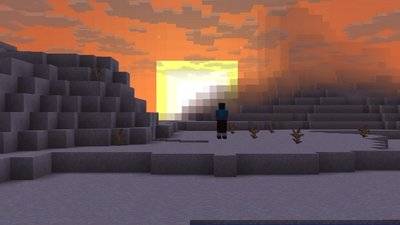
Distance fog hides the edge of your render distance so chunks do not end with a hard line. Improved Fog makes that transition smoother by blending the sky color into the fog, which gives landscapes a more natural horizon.
The exact effect depends on whether Improved Transparency is also on. Mojang listed the combinations in the Snapshot 9 changelog:
| Improved Fog | Improved Transparency | Result |
|---|---|---|
| On | On | Sky and clouds blend into render distance fog (same as the previous snapshot) |
| On | Off | Only the sky blends, clouds do not |
| Off | On | Improved Transparency without the fog effect |
| Off | Off | Classic fog behavior |
Based on the official Minecraft 26.4 Snapshot 9 changelog.
Does Improved Fog Lower FPS?
Mojang says the performance impact of Improved Fog is minimal, but it may be noticeable on lower-end hardware. That is why the setting follows the graphics presets: it is disabled on Fast and enabled on Fancy and Fabulous.
If you play on an older laptop, integrated graphics or a high render distance, try turning Improved Fog off first and compare frame rates in the same area. Combined with the 26.4 switch to Vulkan as the default graphics backend, it is worth testing both settings before deciding.
How to Turn Improved Fog On or Off
1. Open Options from the main menu or pause menu.
2. Go to Video Settings.
3. Find the Improved Fog toggle and switch it on or off. It sits separately from Improved Transparency from Snapshot 9 onward.
4. If you change the graphics preset to Fast, Fancy or Fabulous, check the toggle again, since each preset sets its own default.
Remember that snapshots are test builds. Use a backup world when trying new 26.4 settings.
Who Should Keep It On
Builders and screenshot takers will likely prefer it on, because the blended horizon makes large builds and mountain views look softer. Players focused on performance, PvP or long-distance scouting may prefer it off for a clearer view of distant terrain.
Snapshot 9 also brought the Repeat Recipe/Trade key, data-driven dispensers and keyboard navigation for the Recipe Book, while Snapshot 10 fixed a Multiplayer screen crash. All of these are expected to arrive with the 26.4 Winter Drop.
FAQ (Frequently Asked Questions)
A Java 26.4 video setting that blends the sky, and optionally the clouds, into the fog at the edge of your render distance. Yes. Mojang says it is enabled by default, disabled on the Fast preset and enabled on Fancy and Fabulous. The impact is minimal according to Mojang, but it may be noticeable on lower-end hardware. Yes. Since Snapshot 9 you can turn Improved Transparency on and Improved Fog off. In Minecraft Java 26.4 Snapshot 9, released on November 17, 2026.1. What is Improved Fog in Minecraft?
2. Is Improved Fog on by default?
3. Does Improved Fog hurt performance?
4. Can I use Improved Transparency without the fog?
5. When was the setting added?
Conclusion
The new Improved Fog toggle gives players control over a visual change that used to be locked to another setting. Keep it on for prettier horizons, or switch it off for a sharper view and a few extra frames on older hardware.
- Improved Fog is now separate from Improved Transparency.
- Both on: sky and clouds blend into fog.
- Performance cost is minimal, per Mojang.
- Off on Fast, on for Fancy and Fabulous.